


Designing a Revit template is far more than just a starter file
Creating a Revit template is often seen as a purely technical exercise: defining views, loading families, building schedules, setting up graphic styles, and configuring a few parameters before handing over an .RTE file to the teams.
In practice, this view is far too narrow.
A Revit template forms the backbone of a production environment. It directly shapes how users model, document, search for information, produce deliverables and, ultimately, develop their projects over time. Designing a template therefore involves much more than a handful of software settings: it requires understanding workflows, anticipating needs, weighing up different solutions, and building an environment that is structured enough without becoming overly restrictive.
Finding the right balance between richness and simplicity
One of the first challenges is determining what should actually be included in the template.
It’s tempting to want to load as many families, materials, filters, view templates and configurations as possible in order to cover every possible case. This approach gives the impression of a complete environment, but it can quickly become counterproductive.
An overloaded template increases the number of elements available in selectors, makes searching harder, bloats the file, and makes the whole system more difficult to understand.
Conversely, a template that is too sparse forces users to keep recreating the same elements, undermining much of the value of standardization.
Finding the right level of content is therefore one of the project’s key challenges.
This is, in particular, what leads to distinguishing between the production template and satellite libraries: the former holds the elements that are genuinely recurring, while the latter make it possible to maintain a broader library that is easy to browse and expand.

Building a library rather than accumulating families
The quality of a Revit library doesn’t depend solely on the number of families available.
A true library must make it possible to quickly find the right element, understand how it’s used, identify its variants, and know the conventions associated with it.
The question of naming then becomes essential.
Should descriptive names be favored? A coding system? Acronyms? A combination of several approaches?
There’s no universal answer. A highly detailed name makes immediate understanding easier but can become difficult to work with in schedules. Conversely, a short coding system is more robust and easier to standardize, but requires a reference guide or convention that users are familiar with.
The same reasoning applies to the families themselves: hosted or non-hosted family, type or instance parameters, level of detail, 2D or 3D representation, degree of parameterization, and so on.
A good template therefore isn’t just about providing objects; it’s about providing objects whose behavior is consistent with the expected ways of working.
Making choices without locking down methods
Another major challenge lies in how decisions are made.
On many topics, several solutions are technically possible. Line weights are a good example: Revit offers great freedom, but that freedom can also make the system difficult to understand and maintain.
The most relevant solution is therefore not necessarily the one that uses every possibility the software offers.
It can be preferable to favor a simpler, more memorable, and more consistent solution.
This same logic also applies to phases, view templates, title blocks, tree structures, materials, and naming conventions.
The challenge isn’t to find the best solution in absolute terms, but to find the solution best suited to the context, the users, and the project’s objectives.
This is why a professional template must document not only the choices made but also, where relevant, the alternatives considered, their advantages, their limitations, and the reasons behind the final choice.
This design history becomes particularly valuable when the template evolves or changes hands.
Incorporating the concept of progressive modeling
Another important lesson concerns the level of detail to introduce into the model.
It’s often tempting to try to define the final technical assemblies, final materials, or the full set of an object’s properties right from the start.
But projects evolve.
In the early phases, a generic element can be perfectly suited to the need. It allows work on volumes, surfaces, and overall orientation without prematurely locking in construction choices.
As the project matures, elements can be replaced or refined.
This logic also applies to 2D and 3D representations. The ability to work temporarily or occasionally with 2D elements can be a useful bridge for users coming from AutoCAD, as well as a valuable tool for quickly carrying out certain studies or feasibility assessments.
BIM therefore doesn’t necessarily mean modeling everything right away.
It means reaching the level of definition that’s appropriate for the goal being pursued.
Phases show just how interdependent these choices are
Phase management is a good example of just how complex a template really is.
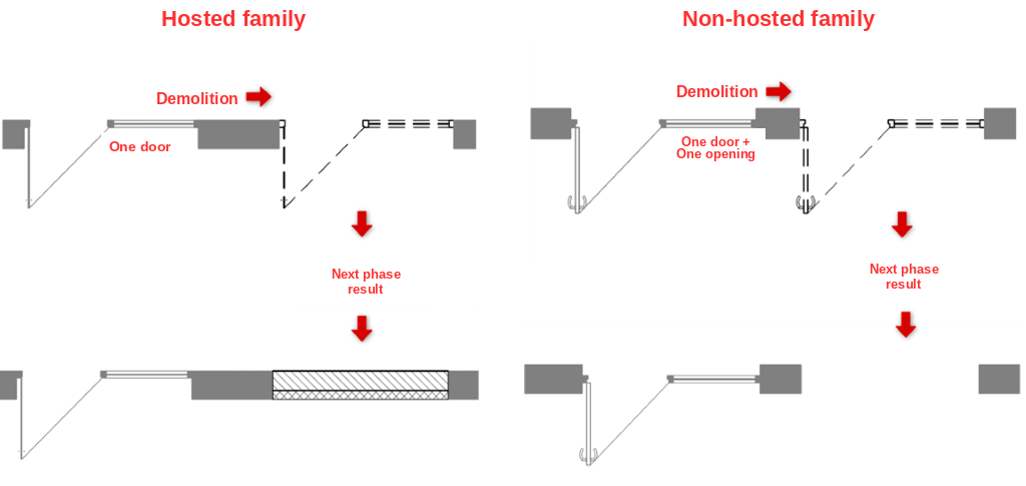
The choice between a hosted family and a non-hosted family can have significant consequences when a project involves existing structures, demolition, and reconstruction.
Similarly, the choice of phases influences view creation, graphic filters, and deliverable production.
Certain decisions must therefore be made by considering their interactions with the rest of the environment.
This is probably one of the key lessons of a template project: no topic is ever fully independent from the others.
Illustration of hosted vs. non-hosted family management:
The template should be thought of as a living environment
Delivering the .RTE file isn’t the end of the project.
On the contrary, it marks the start of a new phase: real-world use.
The first projects reveal which needs are genuinely recurring, which families are missing, which view templates go unused, which tasks are repetitive, which parameters aren’t intuitive, and which conventions work less well than expected.
This is why setting up a pilot project, paired with structured feedback, is particularly valuable.
Improvements can then be prioritized and gradually folded back into the template.
This approach turns the template into a product that improves with each project, rather than a fixed file delivered once and for all.
Documentation is part of the template
A complex template can’t rely solely on the intuition of its designers.
Documentation makes it possible to pass on decisions, explain specific behaviors, and above all, preserve the reasoning behind them.
It also helps distinguish between several levels of information:
- general principles;
- conventions;
- technical possibilities;
- choices made by the client;
- detailed procedures;
- lessons learned;
- areas for future development.
This structure becomes especially important when the template needs to be picked up, maintained, or developed further by other people.
Documentation then becomes a true project memory.
Toward a repeatable design method
Experience ultimately shows that a Revit template shouldn’t be designed as a collection of settings, but rather as a coherent system of decisions.
Every topic: families, materials, graphics, phases, schedules, libraries, parameters, interoperability, collaboration. Each one should be studied, compared, weighed up, and then documented.
This approach paves the way for a more repeatable method:
Analyze → Propose → Compare → Decide → Develop → Test → Document → Evolve.
The standard manual then becomes the reference point for possibilities and lessons learned. The client manual is a tailored version of it, enriched with the choices actually made and the reasoning behind them. Technical data sheets, in turn, allow specific topics that need more in-depth coverage to be explored further.
Conclusion
The success of a BIM template isn’t ultimately measured by the number of families it contains, the number of parameters it exposes, or the number of views it preconfigures.
It’s measured by its ability to enable teams to work in a way that’s consistent, understandable, and efficient, while remaining flexible enough to evolve.
A good template doesn’t try to anticipate every project.
It aims to provide a solid framework for the projects we don’t yet know about.
This is probably where its main challenge lies: building enough standards to guarantee a common foundation, without turning those standards into constraints that would prevent the project from adapting.
And this thinking doesn’t stop once the first template is delivered. On the contrary, it opens up a continuous cycle of experimentation, feedback, and improvement, in which the template, the documentation, the working methods, and the users all evolve together.

Building or rethinking your Revit template shouldn’t be a side project.
As a Platinum Autodesk reseller, Graitec’s BIM consultants help AEC teams design templates, libraries, and standards that actually hold up in production
Related content

Overnight Revit Automation: Which BIM Tasks Should Run After Hours?
19 August 2026Ideate, revit, Revit Productivity
Learn which Revit tasks to automate overnight, from PDF, DWG, and IFC exports to Excel reports, model health checks, and…
Overnight Revit Automation: Which BIM Tasks Should Run After Hours?Read

ISO 19650 Revision 2026: Why the Shift from BIM to IM Changes Everything
18 March 2026bim, general, Ideate, Others, revit, Revit Productivity
The ISO 19650 series has served as the backbone of information management in the built environment since its first publication…
ISO 19650 Revision 2026: Why the Shift from BIM to IM Changes EverythingRead
Future of BIM and Automation – Trends in Machine-Based Revit Productivity Workflows
12 September 2025Ideate, revit, Revit Plugins, Revit Productivity
Key trends shaping the future of BIM, Artificial Intelligence in BIM, BIM and Automation, and how companies can prepare by…
Future of BIM and Automation – Trends in Machine-Based Revit Productivity WorkflowsRead