

AI that drives the design engine, not one that guesses: GRAITEC Assistant in Advance Design modules
19 November 2026AI, Graitec Advance Design

GRAITEC Assistant now works inside the design modules of Advance Design, and every number it shows you still comes from the same deterministic calculation engine. The AI understands what you want and operates the software. It never calculates. That split is what makes the assistant useful to a structural engineer: faster work, with results you can check, sign and defend.
The engineer’s dilemma
Structural engineers are right to be cautious about AI. A design office signs its calculations. A beam that passes only because a language model guessed well is a liability, not a time saver.
Two fears come up in almost every conversation:
- Black-box results. If nobody can explain where a reinforcement area came from, nobody can verify it against the Eurocode.
- Silent errors. A confident but wrong answer is worse than no answer, because it looks finished.
The usual reply, “the AI is now very accurate”, does not settle either fear. Accuracy is a statistic. Design responsibility needs a 100% guarantee.
What GRAITEC Assistant is, and where it now works
GRAITEC Assistant is a conversational layer inside Advance Design. You describe a task in plain language. The Assistant translates it into operations on the software, with access to the functions of the module you are working in.
It has recently been added to the design modules, not only to the main Advance Design environment:
| Area | Modules |
|---|---|
| Modelling and FEM analysis | Advance Design |
| Reinforced concrete design | RC Beam, RC Column, RC Footing, RC Retaining Wall, RC Wall |
| Masonry | Masonry Wall |
| Steel | Selected steel connections |
The point of this list is that the Assistant now sits where design decisions are actually made: at the level of a single beam, column, footing or wall, not only at the level of the whole model.
How it works: the AI steers, the engine calculates
The Graitec Assistant works in a loop: model, run, evaluate, propose. The AI chooses what to try next and reads what comes back. But it is the engine that performs every calculation.

The engineer talks only to the Graitec Assistant, and the Assistant talks to the engine. Numbers travel one way: from the engine to the screen. Nothing in this chain relies on an AI to know the Eurocode by heart, because the engine already applies it.
Determinism: the same input gives the same result
Deterministic means one thing in practice: run the same design with the same inputs twice, and you get identical results, every time. The Assistant does not change that property, because it never produces a design result itself.
Three consequences matter in daily work:
- Traceability. Every result is a calculation of the design engine, with the same checks and the same reports you already know.
- Repeatability. A colleague, a checker or an authority can re-run the design and reproduce your numbers.
- Responsibility stays clear. The engineer decides which solution to accept. The engine proves that it complies. The AI only saves the clicks in between.
The Assistant may still phrase an answer differently from one run to the next. It cannot make a reinforcement area or a utilization ratio different though, because those values are not its output.
What you gain
The benefits come from letting the AI do the operating and the engine do the engineering.
- Less time in dialogs. Ask for a change in words instead of searching through tabs and parameters.
- Multi-step optimization. The Graitec Assistant can chain many engine runs while it weighs several goals at once, such as cost, bar diameters and ease of construction. Cost is one criterion among several, not the only one.
- Consistent results across the team. Every engineer gets answers from the same engine, so a junior’s design and a senior’s design follow the same rules.
- A lower learning curve. New users find functions by describing what they need, and the engine still enforces the code checks.
- Lower risk. There is no AI-generated number to verify, so the review effort stays where it is today.
For a design office, this is the combination that matters: productivity without a new category of risk.
Example: RC Beam, from request to verified solution
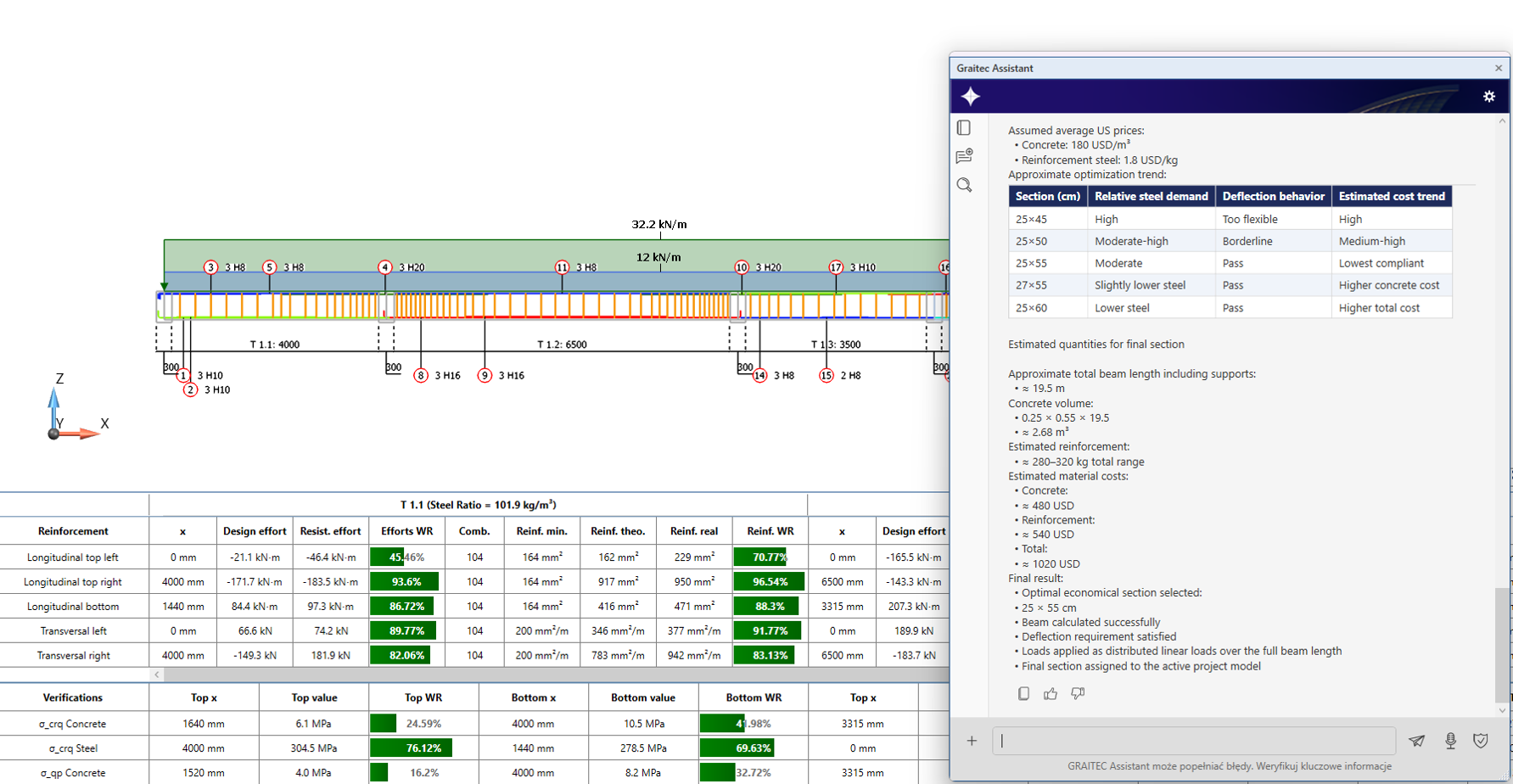
Here is what a typical session looks like.
An engineer opens a continuous beam in RC Beam and types: “Find a cost-effective section and reinforcement that passes all checks, with bar diameters no larger than 20 mm.”
- Graitec Assistant reads the intent. It identifies the goal (lowest cost), the constraint (maximum diameter) and the functions it needs.
- It sets up a candidate. It changes section and reinforcement parameters through the module’s own functions.
- The engine calculates. Ultimate and serviceability checks run in the design engine, exactly as if the engineer had clicked Calculate.
- The Assistant evaluates the results. It reads utilization ratios and the cost indicator from the engine output.
- It iterates, then proposes. After several runs it presents the best compliant option, with the engine’s results for that option.
- The engineer decides. They inspect the full design report, adjust the choice if needed, and accept.
At no point does the Assistant estimate a capacity. It proposes; the engine proves.
Why this approach holds up
The design is not a chatbot added on top of finished software. The Assistant works through the same functions that the modules expose, the same commands an engineer clicks manually and already knows. Nothing is hidden behind the conversation: every step the Assistant takes is one you could have taken yourself, and one you can check.
It also fits GRAITEC’s direction for AI in Advance Design: Assist, Automate, Generate. First the AI helps you use the software. Then it automates repeatable work. Then it generates model content. In each step, the calculation stays with the engine.
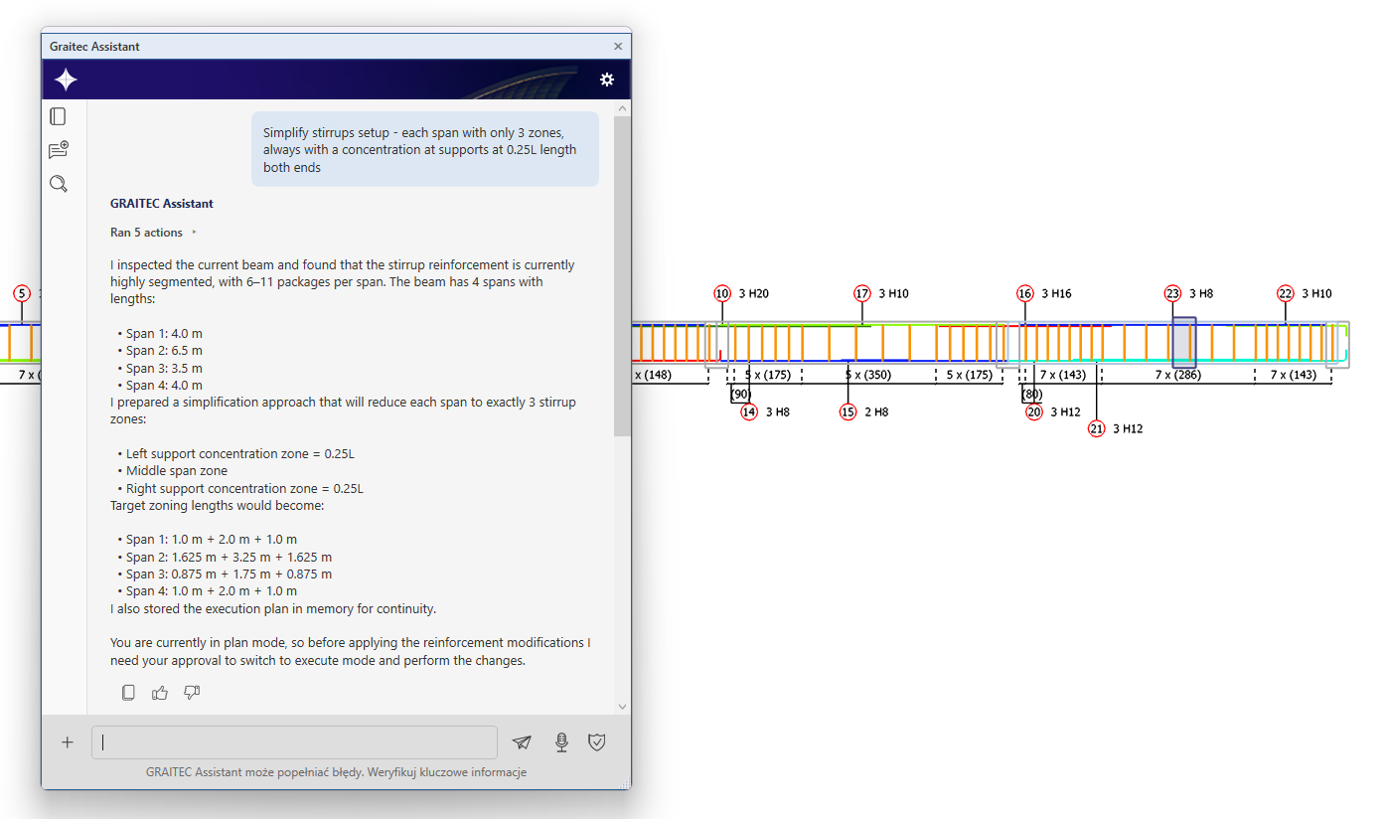
See it in your own project
Open one of your real beams, columns or footings in Advance Design and ask the Assistant to optimize it. Then open the design report and compare it with what you would have done by hand. You will find the engine’s numbers and the engine’s checks, reached in a fraction of the clicks.
Want to see it first? Request a demo from your local GRAITEC team or download the Advance Design 2027.1 trial and test the Assistant on your own project.
Related content

A Quick-Start Guide to the Advance Design API
20 October 2026AI, FEM software, Graitec Advance Design
Discover how the Advance Design API enables structural analysis automation, software integration, and AI-assisted model creation with Python and other…

Best AI Tools for Structural Engineering: What to Actually Look For
1 October 2026AI, Graitec Advance Design
There's no single best AI tool for structural engineering. Here's what to actually check (deterministic output, code depth, real interoperability)…
Best AI Tools for Structural Engineering: What to Actually Look ForRead

How to Build Skills for Your GRAITEC Assistant: Turn Repetitive Engineering Tasks into One-Click Automations
16 September 2026AI, Graitec Advance Design
Learn how to create reusable skills in the GRAITEC Assistant to automate repetitive Advance Design tasks like generating steel portal…