

New Release Graitec STEEL 2027.1: Build More, Recreate Less in Inventor and Advance Steel
19 November 2026GRAITEC STEEL

With the release of Graitec STEEL 2027.1, we’re excited to give steel detailers and fabricators more ways to model stair and railing configurations and new ways to build from the existing geometry in their models. The release covers both Autodesk Advance Steel and Autodesk Inventor, with new railing types, reusable connection and fastener definitions, and a more simplified ways of generating fabrication output from model data. Let’s jump right in.
Graitec STEEL 2027.1 Key Features at a Glance
- More stair and railing configurations on both platforms
- More reuse of existing model geometry in Inventor
- Standardized connection, post and fastener definitions
- Model data that feeds BOM outputs directly, with Graitec Assistant now on both platforms
New in Graitec STEEL for Advance Steel
Panel Railings
A dedicated Panel Railing type handles railings where the panel drives the configuration. Rails and posts now accept compound beams and user sections, so you can build custom railing systems from the exact profiles a project calls for. Special post connections are available specifically for panel railings.
Key Benefit: Architectural and industrial panel railings are modeled parametrically, so design changes are incorporated more easily and manual modeling is reduced.

Panel railing configuration in GRAITEC STEEL for Advance Steel.

Special connections for posts in Panel Railings
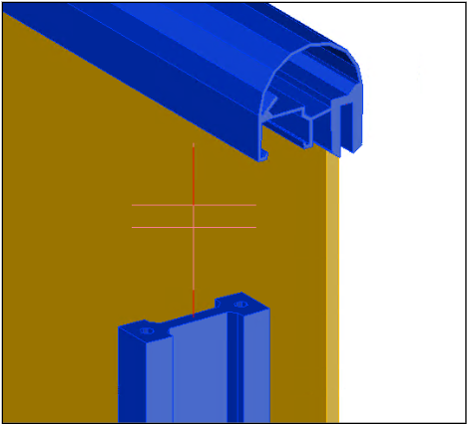
Compound beam for rails in the Panel Railing system
Privacy Screens
The new Privacy Screen gives you a parametric starting point for screen-style assemblies, with dedicated controls for panels and posts.
Key benefit: Move from concept to an editable screen assembly quickly, and keep it inside the same railing tools your team already uses.
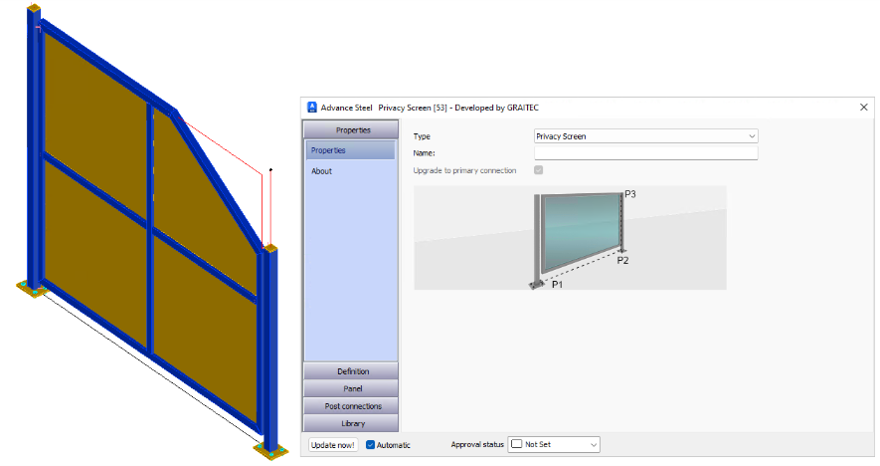
Privacy screen workflow with panel and post controls
Multi-part Railing Connections
Railing connections now support multi-part special parts, so a single connection can contain more than one component. This includes special part connections for middle rails.
What it means for you: Manufacturer-specific and shop-fabricated connection assemblies are represented in the model the way they are built.
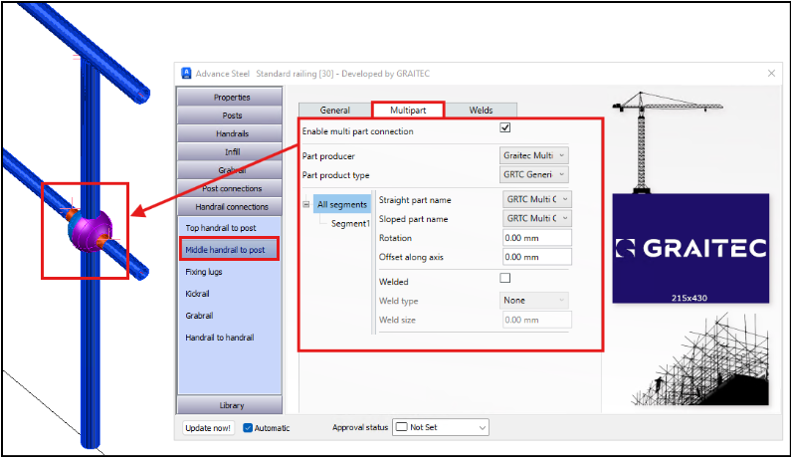
Multi-part railing connection options

Special part connection for Middle rails
New Joint Controllers for Top Handrail Connections
New joint names and controllers are available for Standard Railing and Panel Railing under Top Handrail Connections by Bar:
- GRTCStandardRailing – PostTopBarControl
- GRTCPanelRailing – PostTopBarControl
What it means for you: Apply multiple configurations of this connection within a single railing system.
Cranked Stringer Transitions (Advance Steel and Inventor)
Straight Stairs now include options for how stringers transition into landing elements, including cranked and vertical transfer configurations. This option is available on both platforms.
What it means for you: More real fabrication conditions are captured in the stair definition itself, with parametric editing intact and fewer manual adjustments downstream.
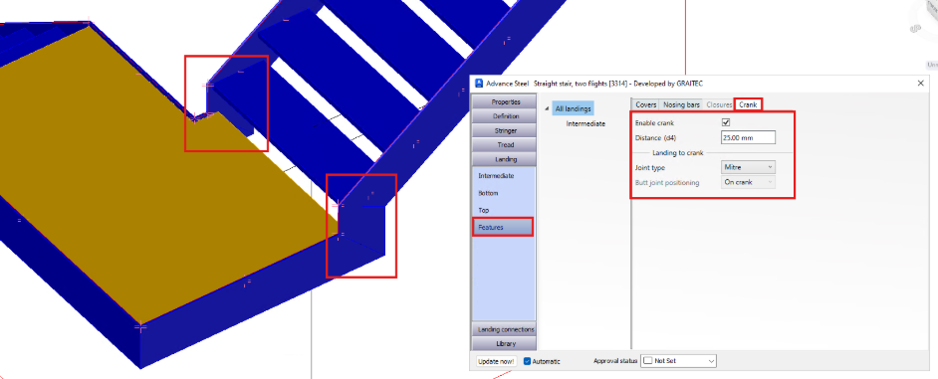
New in Graitec STEEL for Inventor
Curved Railings from 2D Arcs
2D arc elements can now serve as reference geometry for curved railings.
Key benefit: The curve already in your design drives the railing directly, with no extra construction geometry to create or maintain.
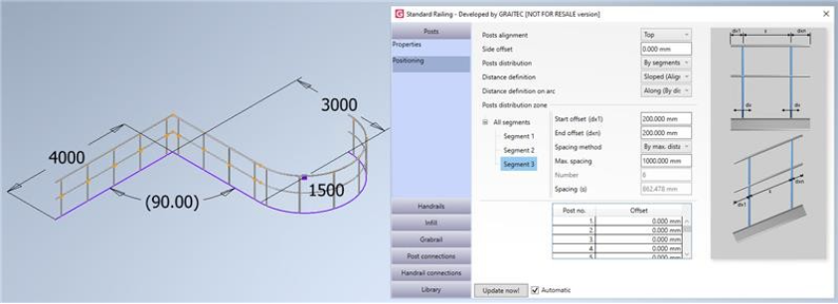
Curved railing created from Inventor arc geometry
Railings on Beam Elements
Straight and curved beam elements can now act as the support for a railing.
Key benefit: Reuse geometry that already exists in the steel model and keep reference geometry to a minimum.
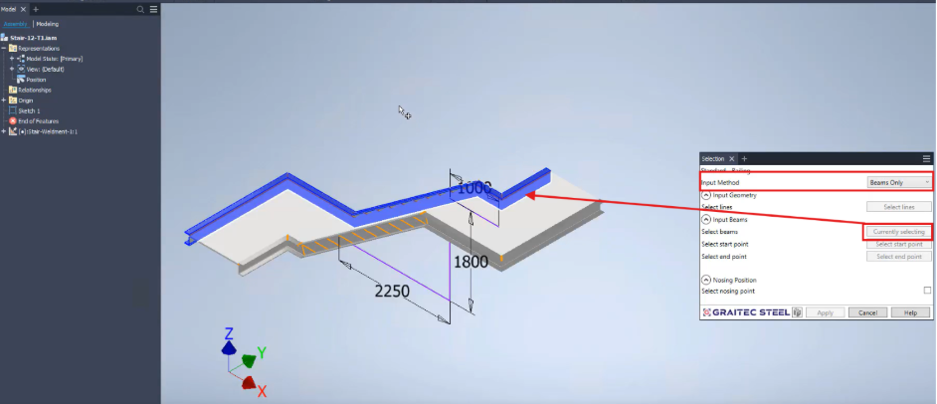
Railing driven by beam geometry in Inventor

Railing driven by curved beam geometry in Inventor
Create from Embedded 2D and 3D Sketches
Stairs and railings can be defined from embedded 2D and 3D part sketches.
Key benefit: Sketch information you have already created becomes a parametric steel assembly, so design intent carries straight through to detailing.

Stair and railing definition from embedded sketch geometry
Special Part Posts
A dedicated Special Part Post option supports railing systems built on custom or manufacturer-specific posts.
What it means for you: Non-standard posts become part of a repeatable railing definition you can use again on the next job.

Special Part Post configuration in Inventor
Double Post Railings
A Double Post Railing option expands the railing arrangements available in Inventor.
What it means for you: Cover more real-world railing layouts while keeping full parametric control.
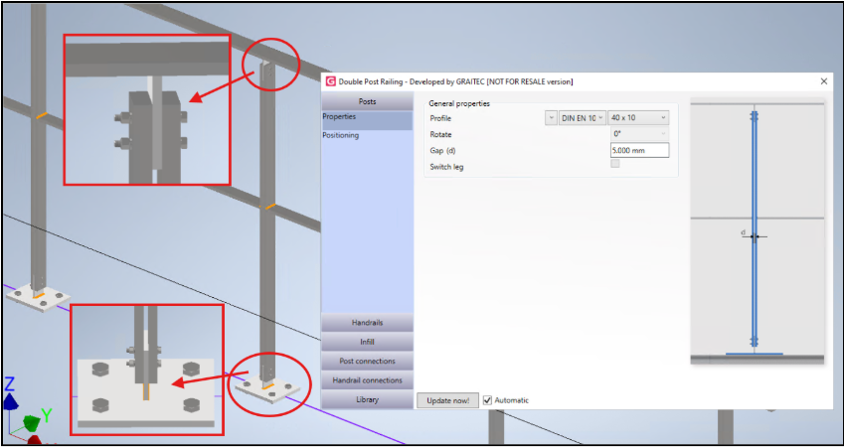
Double-post railing arrangement
Native Slot Holes
All stair and railing connections now support native Inventor slot features for holes.
What it means for you: Manufacturing geometry stays recognizable in Inventor and lines up with downstream fabrication.

Native slot feature in Autodesk Inventor
Bolt Assembly Manager
The Bolt Assembly Manager centralizes the bolt assemblies used by Graitec macros, including the composition of each fastener set together with its hole and diameter settings.
What it means for you: Fastening standards live in one consistent place, so bolt assemblies are configured once and reused across projects.

Bolt Assembly Manager for GRAITEC STEEL macros
Multi-part Base Connections
Standard railing connections gain multi-part base options, with related components organized in the Railing Multi Part category of the Special Part Manager.
What it means for you: Base assemblies reflect the fabricated product and can be reused across railing systems.
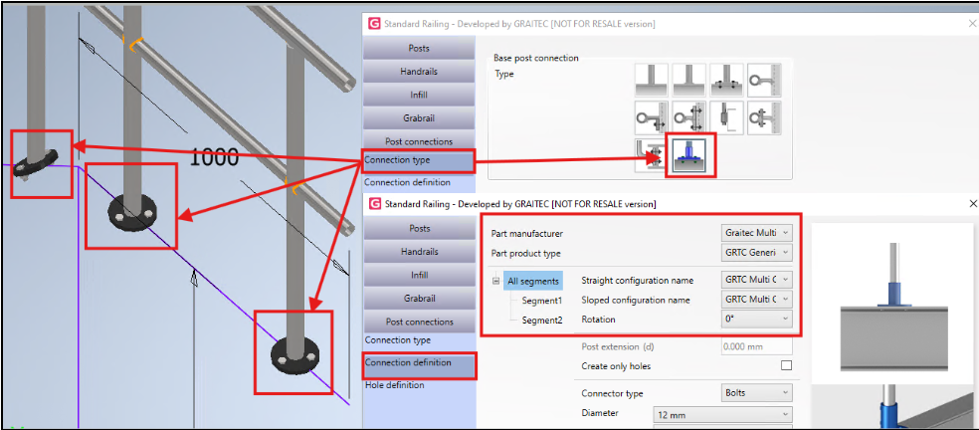
Multi-part railing base connection
Graitec Assistant: from model data to usable information
The Graitec AI Assistant (Graitec Assistant) takes another step in 2027.1, with the goal of reducing repetitive interaction and making steel model information easier to use downstream.
In Advance Steel
Graitec Assistant development extends to assisted modeling, connection deployment, stair and railing creation using Graitec macros, and direct access to model information.
2027.1 also introduces direct model-data extraction for BOM-oriented Excel outputs, alongside XML-based exports. Targeted attributes cover the steel information teams rely on most: marks, lengths, sections, materials, part numbers, quantities, weights, project information and fabrication-related data.
What it means for you: Data created in the steel model is ready to support the next decision, from purchasing to production planning.
In Inventor
With 2027.1, Graitec Assistant comes to Autodesk Inventor through Graitec STEEL. Its first capabilities in Inventor focus on helping users find the answers they need faster.

GRAITEC Assistant supporting steel modelling workflows

Stair Creation via the assistant using Graitec Macros
What 2027.1 means for your team
Steel detailers get more stair and railing configurations out of the box and can build from arcs, beams and sketches already in the model.
CAD and BIM managers gain central control of bolt assemblies, special parts and joint configurations, which makes office standards easier to apply consistently.
Fabrication and production leads see connections, bases and slot holes modeled the way they are built, so shop outputs need fewer corrections.
Principals and owners get a release that reduces duplicated effort on every project and connects model data more directly to the decisions that follow.
Frequently asked questions
What’s new in Graitec STEEL 2027.1? Graitec STEEL 2027.1 adds Panel Railings, Privacy Screens and multi-part railing connections in Advance Steel. Curved, beam-driven and sketch-driven stairs and railings in Inventor. Cranked stringer transitions on both platforms, a Bolt Assembly Manager, and expanded Graitec Assistant capabilities that bring AI powered modeling into Inventor and Advanced Steel.
Which versions of Autodesk software does Graitec STEEL 2027.1 support? Graitec STEEL 2027.1 supports Autodesk Advance Steel 2026 and 2027, and Autodesk Inventor 2026 and 2027.
Is Graitec Assistant available in Inventor? Yes. Graitec STEEL 2027.1 introduces Graitec Assistant in Inventor, with first capabilities focused on helping users find answers faster. Advance Steel offers a broader set, including assisted modeling, connection deployment and BOM-oriented data extraction.
Can I create railings from existing geometry in Inventor? Yes. Railings can be driven by 2D arcs, straight and curved beam elements, and embedded 2D and 3D part sketches.
What is the Bolt Assembly Manager? The Bolt Assembly Manager is a central library for the bolt assemblies used by Graitec macros. It stores fastener composition along with hole and diameter settings so teams can apply consistent fastening standards across projects.
See Graitec STEEL 2027.1 in action
Book a demo to see how Graitec STEEL 2027.1 fits the way your team details and fabricates steel.
Related content

The Inventor Add-In That Automates Exports, BOMs, Drawings and Model Cleanup
16 October 2026GRAITEC STEEL
See which Autodesk Inventor add-in automates exports, BOMs, drawings and model cleanup for manufacturing teams, with GRAITEC STEEL.
The Inventor Add-In That Automates Exports, BOMs, Drawings and Model CleanupRead

Steel Modeling Automation for Beams, Plates, Grids, and Openings
28 September 2026GRAITEC STEEL
How GRAITEC STEEL automates beam, plate, grid, and opening modelling in Advance Steel, tool by tool, with what each one…
Steel Modeling Automation for Beams, Plates, Grids, and OpeningsRead

Meet GRAITEC STEEL – Steel Detailing, Stairs and Railings in Autodesk Inventor
11 September 2026GRAITEC STEEL, inventor, Stairs & Railings
We’re excited to introduce GRAITEC STEEL, a steel detailing and fabrication plugin for Autodesk Inventor and Advance Steel, giving detailers…
Meet GRAITEC STEEL – Steel Detailing, Stairs and Railings in Autodesk InventorRead